
Hej
Denna vecka har vi satt oss ner och pratat med Emilia Liljeström om Acandos satsning i Fashion Retailers segmentet och spekulerar lite i hur framtiden kan komma att te sig i modebranchen
/DynamicsPodden



Hej
Denna vecka har vi satt oss ner och pratat med Emilia Liljeström om Acandos satsning i Fashion Retailers segmentet och spekulerar lite i hur framtiden kan komma att te sig i modebranchen
/DynamicsPodden
Vi är tillbaka med ett nytt avsnitt av Dynamicspodden från Acando. Denna gången pratar vi med Michael Schibbye om Acandos Retail satsning, retail i Dynamics 365 for Operations och vilket mickes drömprojekt är
/Dynamicspodden
One of our customer are going to use the AX 2012 R3 Retail solution and the setup of the Async Server – Client in the TEST environment was setup and tested. The application consultants started importing the product data to AX and suddenly the sync stopped with this error:
Microsoft.Dynamics.Retail.StoreConnect.Request.SQLHandler.ProcessSourceRequestHeaderException: ProcessTargetRequestHeader failed due to an InvalidOperationException.connectionString: Data Source=XXXXXX;Initial Catalog=ClientChannelDB;Integrated Security=True;Connect Timeout=60;Application Name=”Commerce Data Exchange Async Client” —> System.InvalidOperationException: The given value of type String from the data source cannot be converted to type nvarchar of the specified target column. —> System.InvalidOperationException: String or binary data would be truncated.
After having a look online I found that there is no sync of the schema between the AX database and the Channel Database (!!!). This meant that when we imported data to AX everything worked but when we did the sync jobs it failed. The reason being that some field types did not match.
After talking to MS support I got a script to try to figure out which fields were wrong
select t1.table_name, t1.column_name, t1.character_maximum_length, t2.character_maximum_length
from MicrosoftDynamicsAX.INFORMATION_SCHEMA.columns t1
inner join RetailHoustonStore.INFORMATION_SCHEMA.columns t2
on t1.table_name = t2.table_name
and t1.column_name = t2.column_name
and t1.character_maximum_length != t2.character_maximum_length order by TABLE_NAME
this query finds all of the fields which are not matched between the AX database and the Channel Database. With some help we found that the issue probably was the field called RETAILVARIANTID which was present in INVENTDIMCOMBINATION and INVENTITEMBARCODE
We ran these SQL queries:
ALTER TABLE [ClientChannelDB].ax.INVENTDIMCOMBINATION ALTER COLUMN RETAILVARIANTID nvarchar(25) NOT NULL;
ALTER TABLE [ClientChannelDB].ax.INVENTITEMBARCODE ALTER COLUMN RETAILVARIANTID nvarchar(25) NOT NULL;
And there was also a view called INVENTDIMCOMBINATION which we scripted out to a query windows, deleted and recreated again. This solved the issue.
I had an issue today with the sync between Async Server and Client. Some of the jobs worked and some threw an error
Microsoft.Dynamics.Retail.StoreConnect.Request.SQLHandler.ProcessSourceRequestHeaderException: ProcessTargetRequestHeader failed due to an InvalidOperationException.
connectionString: Data Source=XXXXXXXX;Initial Catalog=ClientChannelDB;Integrated Security=True;Connect Timeout=60;Application Name=”Commerce Data Exchange Async Client” —> System.InvalidOperationException: The given value of type String from the data source cannot be converted to type datetime of the specified target column. —> System.FormatException: Failed to convert parameter value from a String to a DateTime. —> System.FormatException: String was not recognized as a valid DateTime.
at System.DateTimeParse.Parse(String s, DateTimeFormatInfo dtfi, DateTimeStyles styles)
at System.Convert.ToDateTime(String value, IFormatProvider provider)
at System.Convert.ChangeType(Object value, Type conversionType, IFormatProvider provider)
at System.Data.SqlClient.SqlParameter.CoerceValue(Object value, MetaType destinationType, Boolean& coercedToDataFeed, Boolean& typeChanged, Boolean allowStreaming)
— End of inner exception stack trace —
at System.Data.SqlClient.SqlParameter.CoerceValue(Object value, MetaType destinationType, Boolean& coercedToDataFeed, Boolean& typeChanged, Boolean allowStreaming)
at System.Data.SqlClient.SqlBulkCopy.ConvertValue(Object value, _SqlMetaData metadata, Boolean isNull, Boolean& isSqlType, Boolean& coercedToDataFeed)
— End of inner exception stack trace —
at System.Data.SqlClient.SqlBulkCopy.ConvertValue(Object value, _SqlMetaData metadata, Boolean isNull, Boolean& isSqlType, Boolean& coercedToDataFeed)
at System.Data.SqlClient.SqlBulkCopy.ReadWriteColumnValueAsync(Int32 col)
at System.Data.SqlClient.SqlBulkCopy.CopyColumnsAsync(Int32 col, TaskCompletionSource`1 source)
at System.Data.SqlClient.SqlBulkCopy.CopyRowsAsync(Int32 rowsSoFar, Int32 totalRows, CancellationToken cts, TaskCompletionSource`1 source)
at System.Data.SqlClient.SqlBulkCopy.CopyBatchesAsyncContinued(BulkCopySimpleResultSet internalResults, String updateBulkCommandText, CancellationToken cts, TaskCompletionSource`1 source)
at System.Data.SqlClient.SqlBulkCopy.CopyBatchesAsync(BulkCopySimpleResultSet internalResults, String updateBulkCommandText, CancellationToken cts, TaskCompletionSource`1 source)
at System.Data.SqlClient.SqlBulkCopy.WriteToServerInternalRestContinuedAsync(BulkCopySimpleResultSet internalResults, CancellationToken cts, TaskCompletionSource`1 source)
at System.Data.SqlClient.SqlBulkCopy.WriteToServerInternalRestAsync(CancellationToken cts, TaskCompletionSource`1 source)
at System.Data.SqlClient.SqlBulkCopy.WriteToServerInternalAsync(CancellationToken ctoken)
at System.Data.SqlClient.SqlBulkCopy.WriteRowSourceToServerAsync(Int32 columnCount, CancellationToken ctoken)
at System.Data.SqlClient.SqlBulkCopy.WriteToServer(IDataReader reader)
at Microsoft.Dynamics.Retail.StoreConnect.Request.SQLHandler.SCSqlWriteRequestRunner.BulkCopyData(SqlConnection connection, SqlTransaction transaction)
at Microsoft.Dynamics.Retail.StoreConnect.Request.SQLHandler.SCSqlWriteRequestRunner.Run(SqlConnection connection, SqlTransaction transaction)
at Microsoft.Dynamics.Retail.StoreConnect.Request.SQLHandler.SCSqlTargetRequestHandler.ProcessWriteRequest(SqlConnection connection, SqlTransaction transaction)
at Microsoft.Dynamics.Retail.StoreConnect.Request.SQLHandler.SCSqlTargetRequestHandler.ProcessTargetRequestHeader(ISCTargetRequestHeader targetRequestHeader)
— End of inner exception stack trace —
at Microsoft.Dynamics.Retail.StoreConnect.Request.SQLHandler.SCSqlTargetRequestHandler.ProcessTargetRequestHeader(ISCTargetRequestHeader targetRequestHeader)
at Microsoft.Dynamics.Retail.SynchClient.Core.DownloadAgent.ApplySessionFileToClientDatabase(SessionManager sessionMgr, String fileName)
The error turned out to be a mismatch in the configuration of the Channel Data Group where I had set the force locale to EN-UK instead of EN-US and apprently there is a difference in the date format. After changeing this parameter everything worked again.
Todays issue is regarding AX 2012 Retail…
When I try to Process status messages under Retail – Inqueries – Download sessions i get the following error
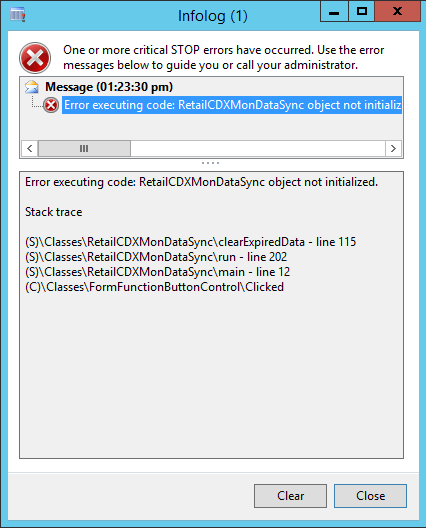
First I found some hints online that it had to do with the Working Folders set up in Retail – Setup – POS – Retail Scheduler – Channel Integration – Working Folders. I verified that the settings were OK and then I set the permissions on the folders to allow the service account for AsyncServer/AsyncClient had full access to them.
That did not help… strange… so I thought that I really needed to verify the permissions… Process Monitor to the rescue

Apparently the changes I made did not propagate all through the folder structure… After fixing it everything is working nicely.
Today little issue was a bit frustrating…. to say the least
I have set up a new AX 2012 Vm in Azure for my colleagues to do some troubleshooting on. The need to install a Hotfix there and thus needs Internet Access from the VM. Normally this is not a problem… there are normally no issues accessing the internet from a correctly configured VM… the key phrase being correctly configured
I installed the VM from LifeCycle Services which is the normal way for AX machines which means I get a preconfigured VM with AX 2012 and it also has Active Directory installed locally to decrease dependencies. I am able to access the VM but no internet access… so I do some basic testing and I can do nslookup when using an external DNS which tells me 1) the VM has internet Access and 2) there is something wrong with the DNS settings. The local dns setting is pointing to the address is pointing to 10.20.12.4 which has nothing to do with my VM. So I tried to change it to 127.0.0.1 and as soon as I saved the settings the connection to the VM dropped… that is strange. I tried again after restarting but got the same result. So what to do…
I tried changing it using Powershell… Success!! Restarted the VM and it was back to 10.20.12.4… Fail!! Something is rotten in the state of Denmark…
I started by looking through Group policies for something strange but could not find anything. So I fired up Sysinternal Autostart and found a strange script:
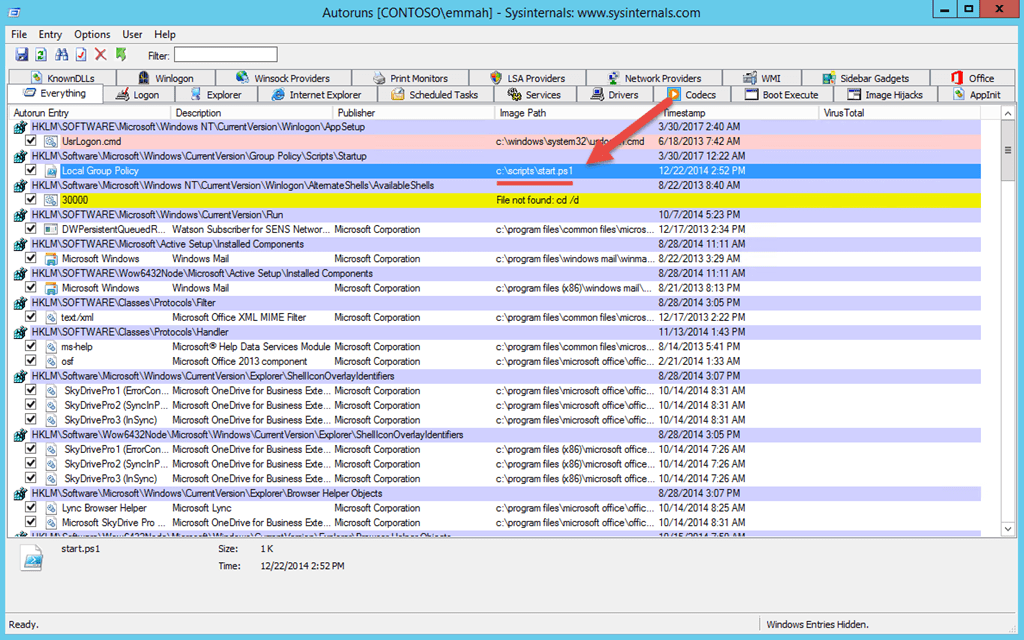
Hmmm… Looking at the script:
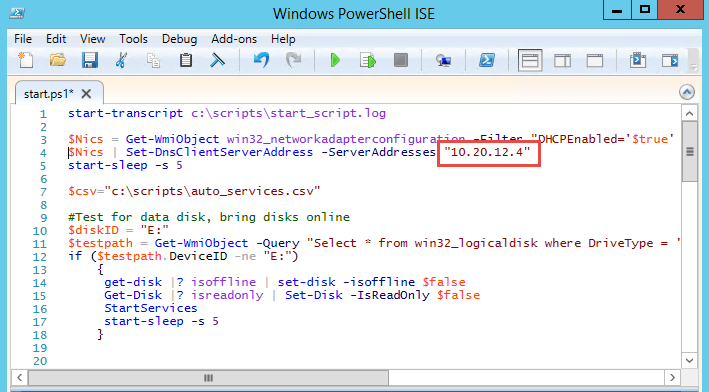
I found it!! This is not OK!!! Well, well… I changed the script and restarted and it worked… So if your AX 2012 VM is behaving strangely look at the c:\scripts\start.ps1 script. It also fiddles with services autostart settings and some other things
/Johan
Howdy…
Vi har i veckan varit i Seattle och besökt Technical Conference 2017 för att se var Microsoft har på gång vad det gäller Dynamics. Vi har dagen till ära spelat in ett extra avsnitt där vi pratar lite om våra reflektioner på konferensen. Det kommer garanterat att komma med så småningom.
/DynamicsPodden
Hej
I avsnitt 4 av DynamicsPodden går vi igenom rapportering i Dynamics 365 for Operations och tittat på vilka likheter och skillnader som finns jämfört med AX 2012. Vi tittar på Power BI, Management reporter och Reporting Services
DynamicsPodden
Hej
Då var vi tillbaka med ett nytt avsnitt av DynamicsPodden. Denna gång har Emelie, Jonathan och Johan samlats för att prata om mobilitet. Vad betyder egentligen Anywhere, Anytime? Hur ser upplevelsen ut på mobila enheter, hur är kompatibiliteten med andra browsers och vad behöver vi fundera kring när det gäller säkerheten?
Håll till godo
/DynamicsPodden
I have been trying the past couple of bays to get retail up and running on the Microsoft Dynamics AX 2012 R3 demo environment. There are some issues in the default environment that needs to be fixed before everything is running flawlessly.
One issue I noticed was that the SSL certificate used between the async client and async server has expired (in 2015  ).
).
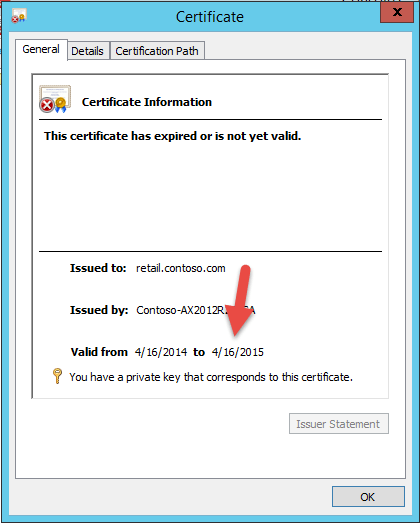
To fix this we first need to request and issue a new certificate. Since the CA in the Demo is a stand-alone CA we cannot use the MMC to request the certificate, so I am using the web interface. Start Internet Explorer and browse to the address https://localhost/certsrv (since the certificate for the site is not issued to localhost there will be an error… ignore this).
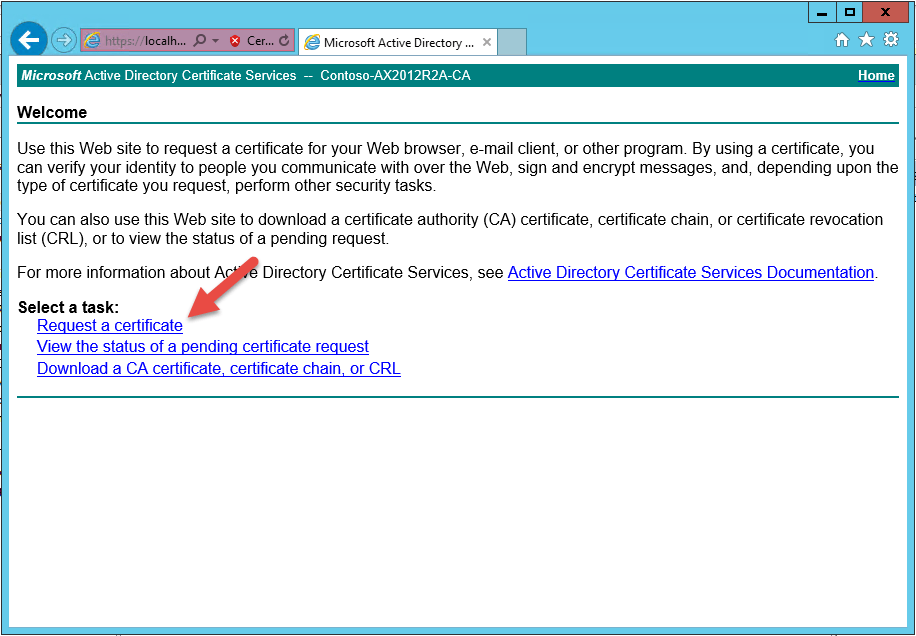
Select Request a certificate
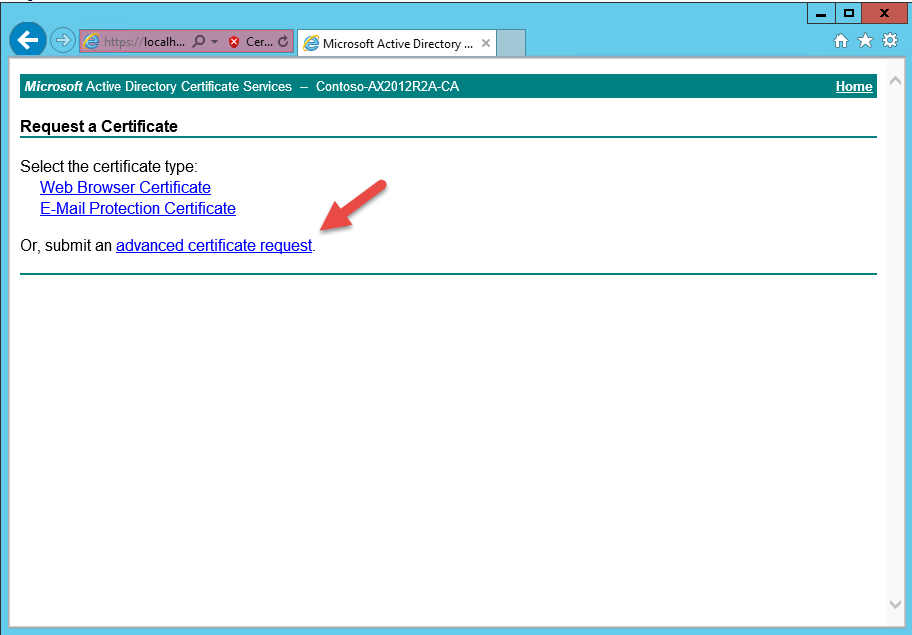
Select advanced certificate request
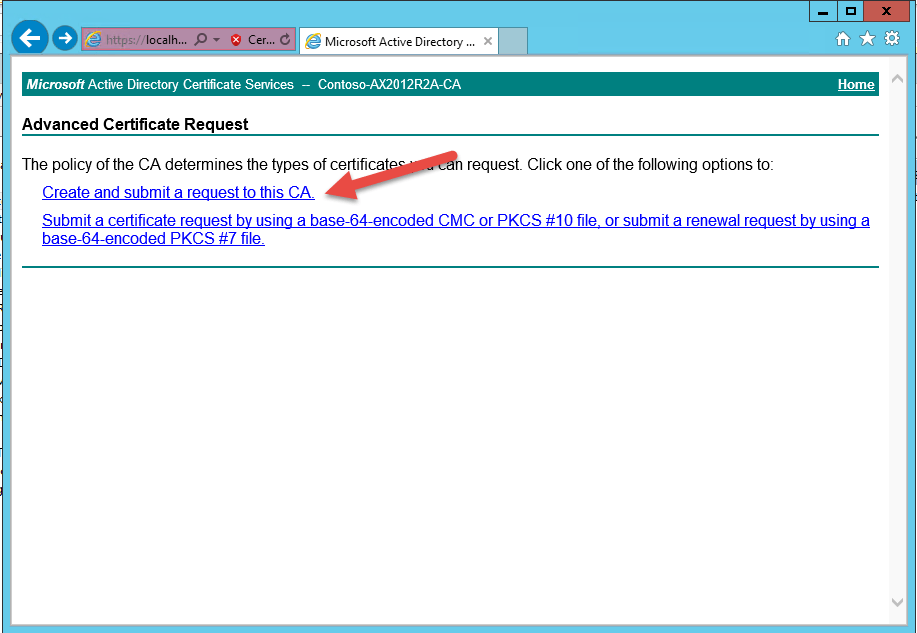
Select create and submit a request to this CA
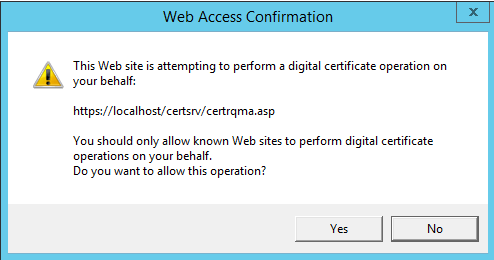
Click Yes to continue
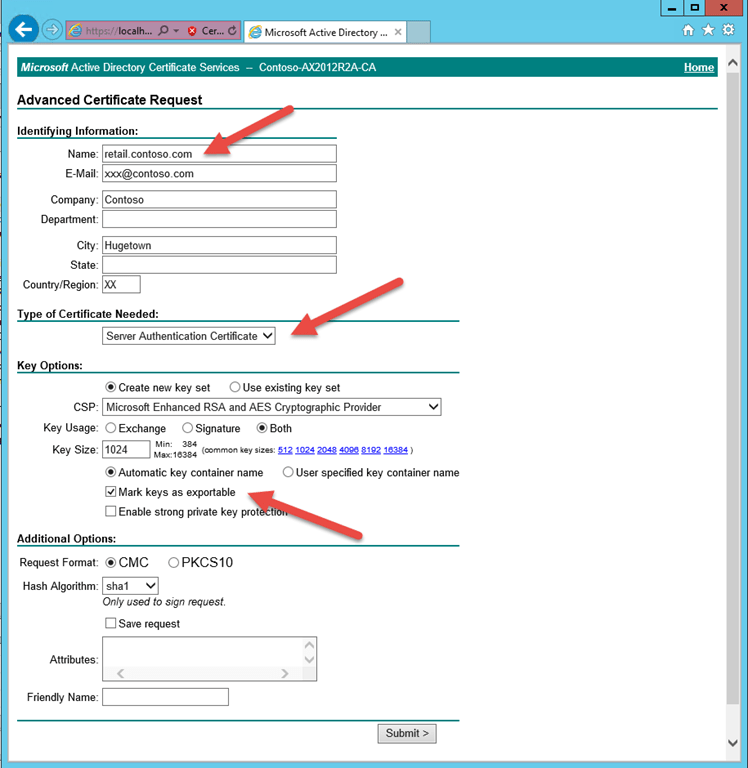
Fill in the name of the certificate. In our case the adress is retail.contoso.com, the other fields are not mandatory. Select Server Authentication Certificate and check Mark keys as exportable. Click Submit.
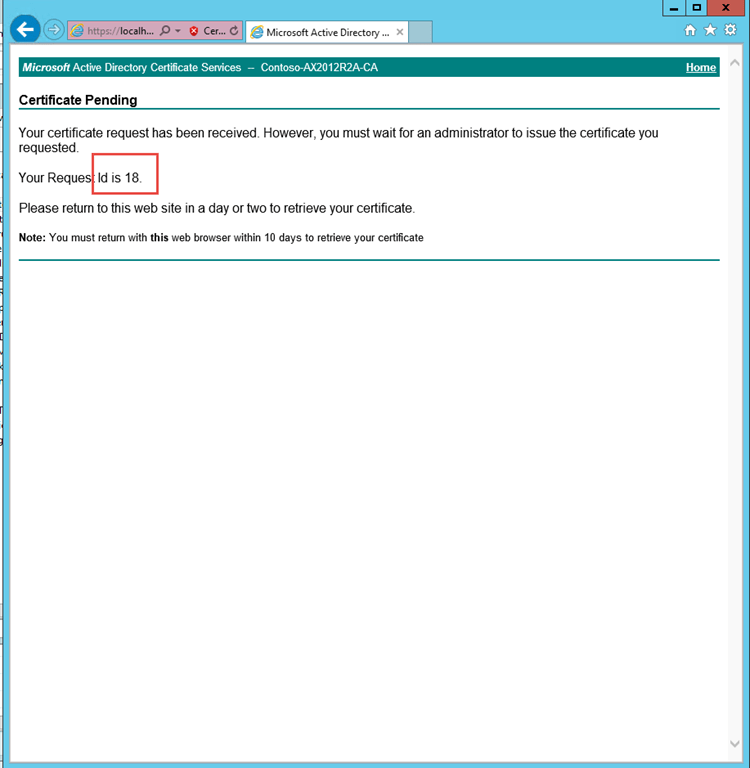
Note the id of the request and start the Certificate Authority mmc Management Console
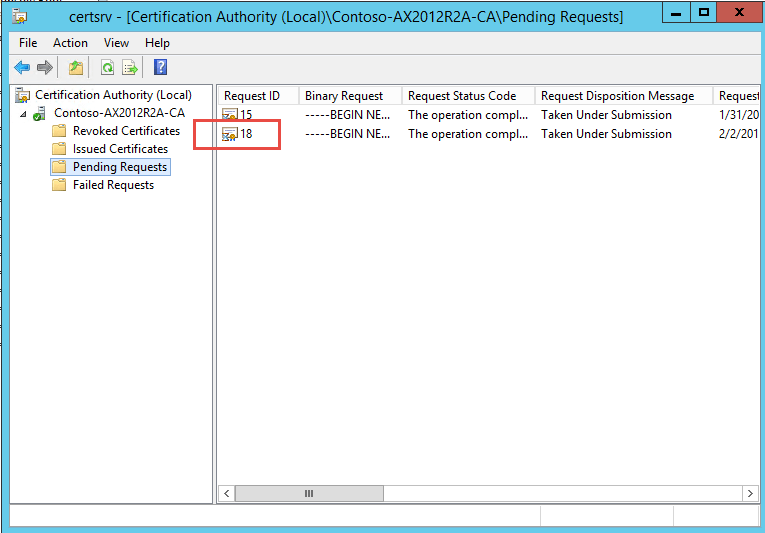
Find the request above under Pending Request. Right-click and select the task Issue
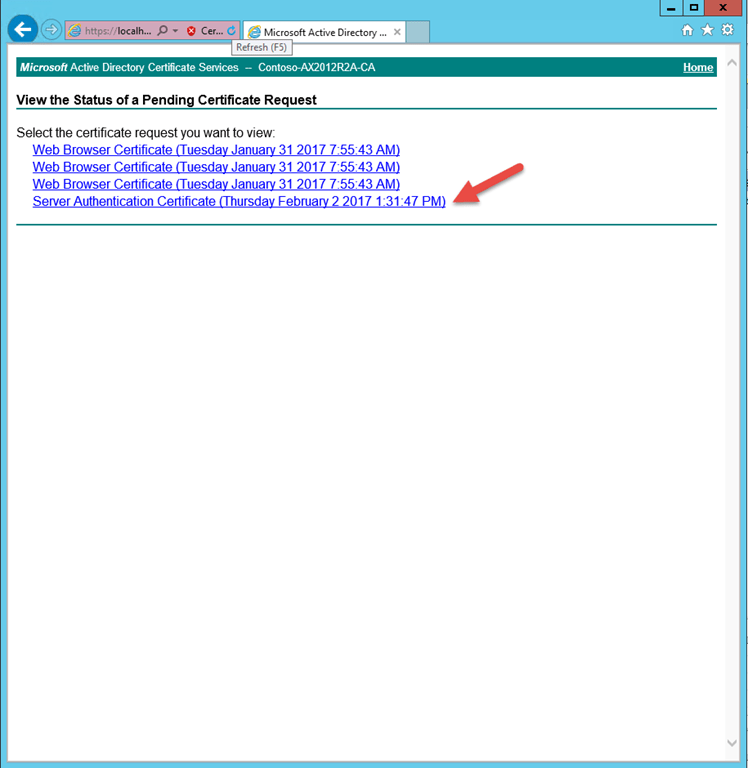
Go back to https://localhost/certsrv and click View the status of a pending certificate request. Click your request.
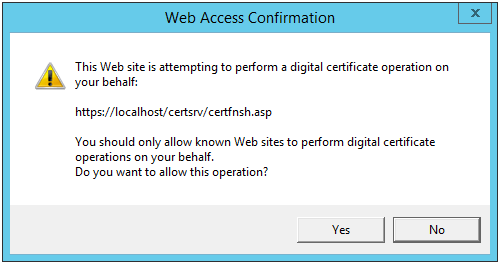
Click Yes to continue.
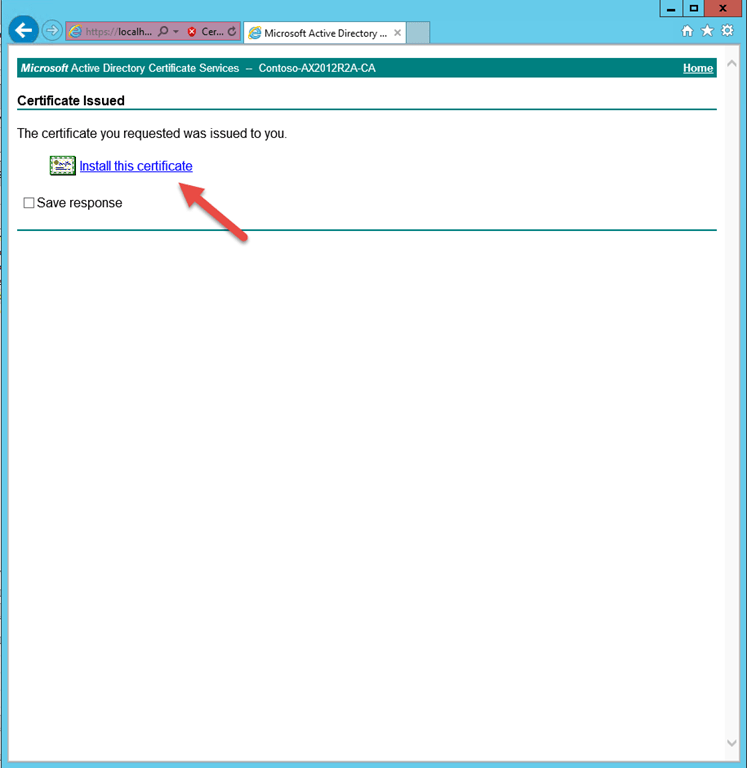
Click the Install this certificate. Unfortunately the certificate will be installed in you personal Certificate Store and you will have to move it before IIS can use it.
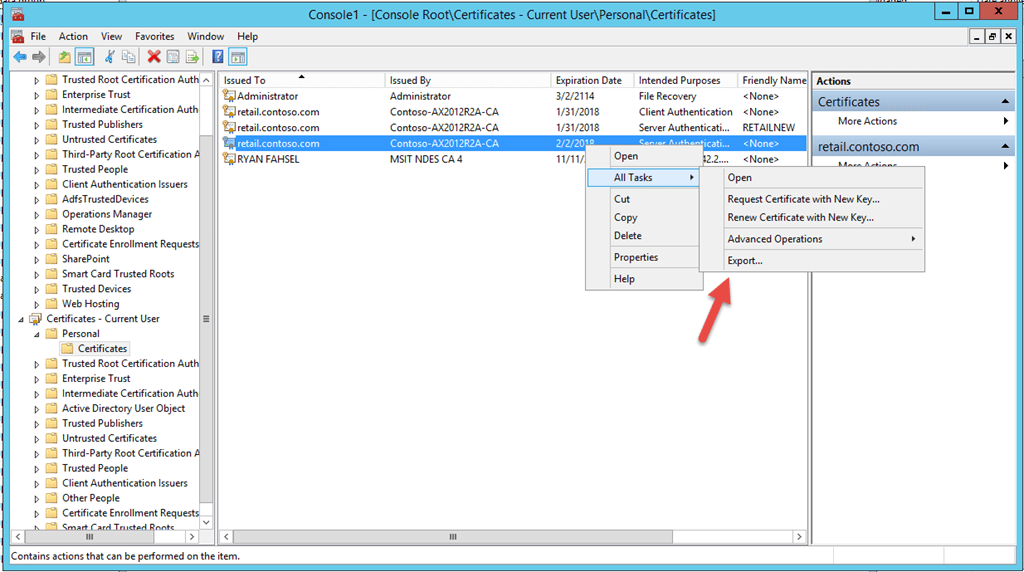
Start the management Console and add the Certificates snap-in for Current User and for Local Computer. Go to Current User – Personal – Certificates and find your new certificate
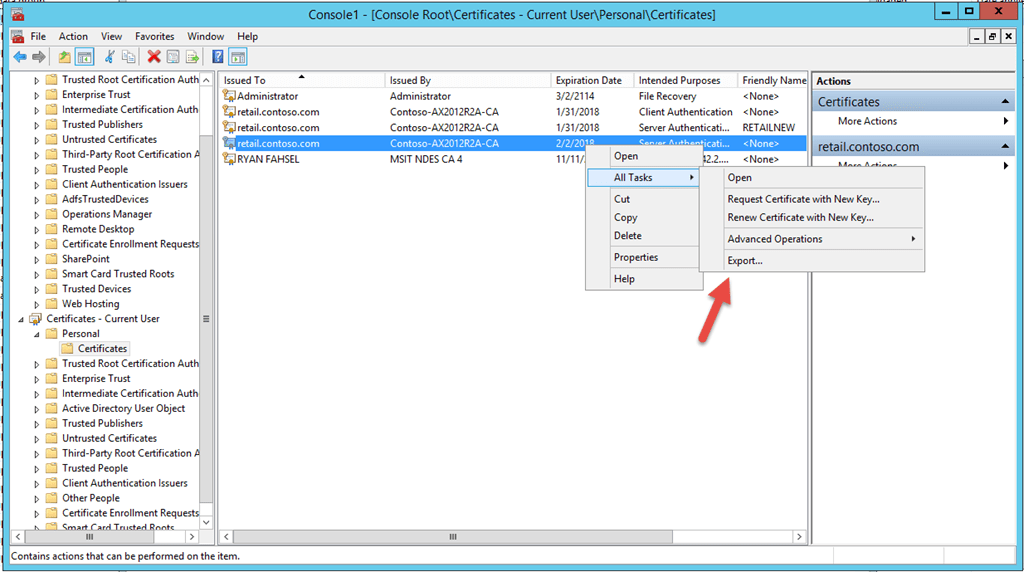
Right click the certificate and select Export
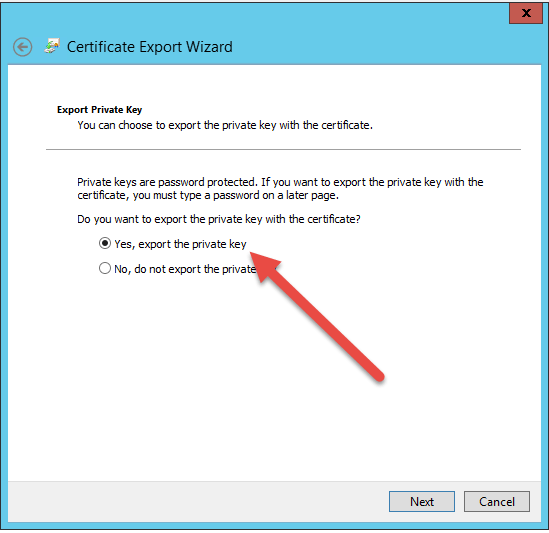
Select Yes, export the private key
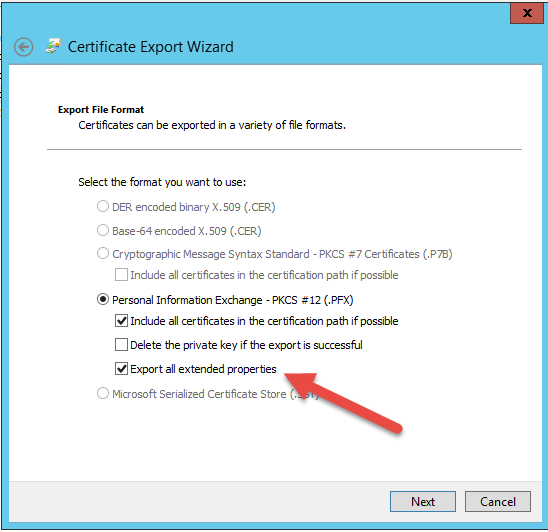
Check Export all extended properties and click next
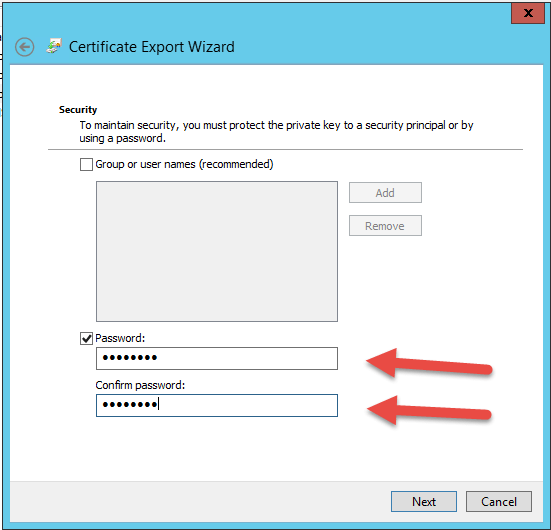
Enter a password and click next
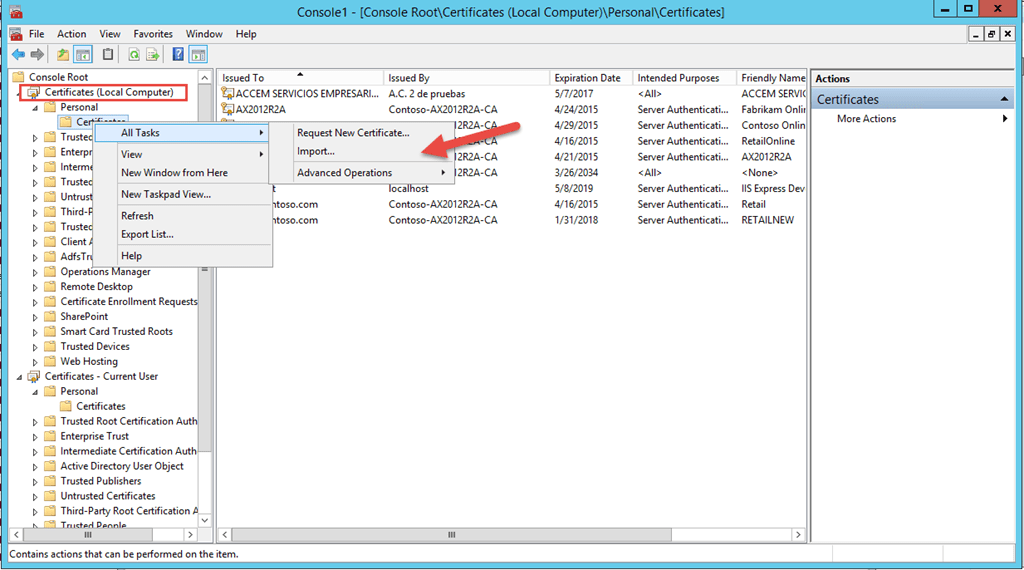
In the console on Local Computer – Personal – Certificates right click and import the Certificate you exported previously
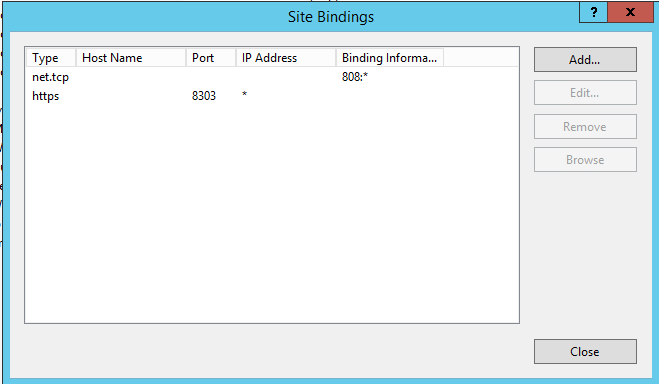
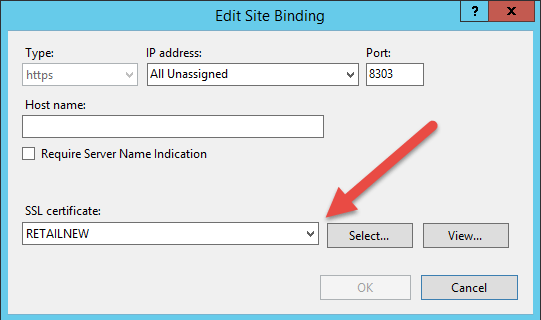
In IIS Manager edit Binding for the sites AsyncServerSite and Retail Server Website and change the certificate for HTTPS. Restart the IIS sites.
That is all
/Johan