


Today I will take a short look at enabling password reset using the rdweb component in Windows Server 2012.
This functionality is built in to Remote Desktop but it it not enabled by default. In this article we will look at enabling it and also creating a link to it on the login page
We start of by enabling the Password Reset feature.
- Start IIS Manager on your RDWeb Server
- Browse to [Server Name] – Sites – Default Web Site – RDWeb – Pages
- Open Application Settings
- Change the property PasswordChangeEnabled to true
- To test the password reset functionality browse to
https://[Servername]/RDWeb/Pages/en-US/password.aspx
and you will se this
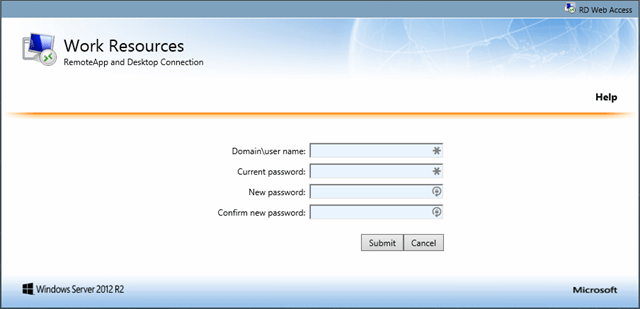
When a user tries to log in using an expired password they will get this:

Now, to enable the link on the login page…
- Using an elevated notepad (or tool of your choice) edit the file
C:\Windows\Web\RDWeb\Pages\en-US\login.aspx
- Go down to line 583 and add the following line
<a href=https://[ServerName]/RDWeb/Pages/en-US/password.aspx>Password Reset Utility</a>
- Save the page
- Browsing to the login page for RDweb and verify the change
/Johan
Links
http://ryanmangansitblog.com/2013/03/11/add-password-reset-feature-to-remote-desktop-web-access-2012/
http://blogs.msdn.com/b/rds/archive/2014/06/04/failed-logons-due-to-expired-passwords-password-change-functionality-in-rd-web-access.aspx